Weekly Photo Challenge: My Neighborhood Iphoneagraphy
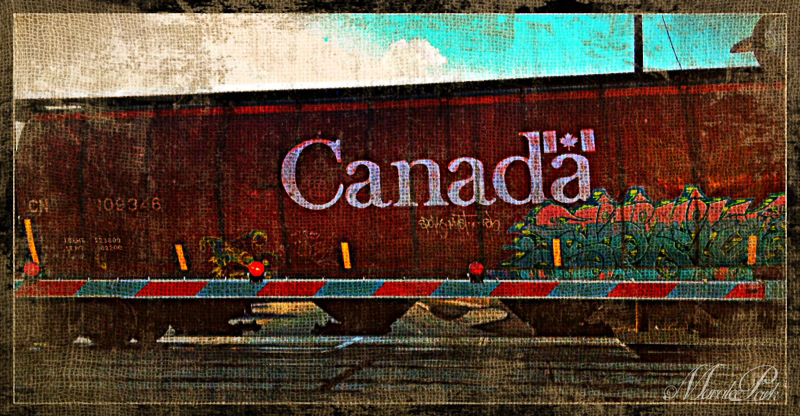
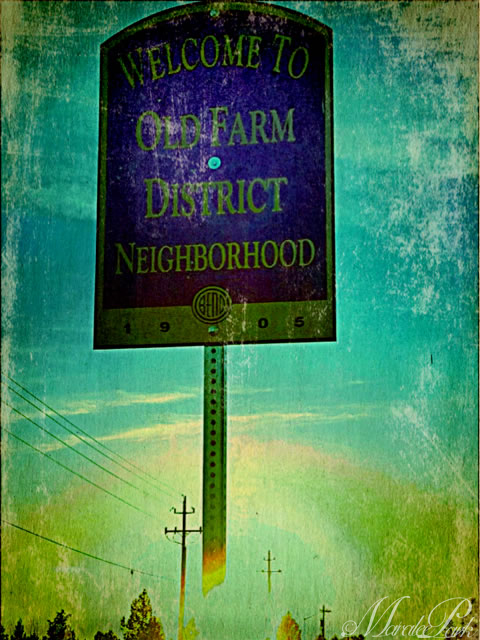
We happened to be the first car at a train stop so I took a couple of shots of the passing train.Different parts of town have been identified with historical markers, i.e. Orchard District, Old Mill District. We lived in the Old Farm District.
I wanted to try out some different apps on my iPhone and this is a good challenge to test them out. These are just various shots taken over a couple of days while out and about around town.
While out for our walk around sunset, the clouds had a wonderful glow.
I may have “over cooked” some of these photos, but they were fun.
We do have some nice scenery here. Right now it’s clear and the mountains are white with snow. Some days it takes my breath away. I wish we would get a little of the moisture here – we could really use it before fire season.
Maralee I love these shots, don’t think they are “over cooked’.. 🙂 Last capture is awesome. I use Snapseed and BeFunky BUT could you tell me the process of just getting a photo from your iPhone to your blog posted. I am having trouble getting the right size. Not the post processing part you do, just snap picture get it sized and on the blog. I have to be doing something wrong. Any help you could give would be appreciated.
I send the photo to my email. It asks me what size and I always use the largest size. Then I download it from my email to my desktop and then import it to my blog and go from there. When I import it to my blog, I use the largest size there, too. I’m sure there’s a better way, but this way is easiest for me. Maybe someone else has a better way.
It sounds like a very good way. I am always trying to take it to Pixlr, size it and put a watermark on it. And get it the right size on the blog. The iPhone shots are a wonky size. Thank you so much!
Love your iphone photos. Nice app. Looks like oil paintings.
Thank you so much. The apps I used the most are Snapseed and Pic Grunger. I just downloaded a couple more but haven’t had a chance to figure them out yet.
This is very different … and I like very much – you have been really been playing around here with great results. My pick is the one with the sign – Old Farm Distric.
Thanks, Viveka. I had to play around with the sign photo quite a bit. It was taken with the sun setting behind the sign so it was a difficult exposure.
These are fantastic Maralee ! I need to get the grunger app, it is so fun. Another way I get my photos to upload is through the photostream apple offers. Works much better than it did a year ago with a PC
Not overcooked at all. Just cool taken to a new level. I’m inspired to try more than kelvin, toast, retro and nashville (or whatever they are called on instagram!). Can you give us some advice on apps?
Thanks, Wendy. The apps I use the most on my phone are Snapseed and PicGrunger. I have a couple of others I haven’t had a chance to play around with and figure out. I’ll let you know how I like them when I do.


 Maralee
 Through My Lens
At least you have interesting scenery! I love these. Overcooked? In the eye of the beholder, I suppose.
We do have some nice scenery here. Right now it’s clear and the mountains are white with snow. Some days it takes my breath away. I wish we would get a little of the moisture here – we could really use it before fire season.
Maralee I love these shots, don’t think they are “over cooked’.. 🙂 Last capture is awesome. I use Snapseed and BeFunky BUT could you tell me the process of just getting a photo from your iPhone to your blog posted. I am having trouble getting the right size. Not the post processing part you do, just snap picture get it sized and on the blog. I have to be doing something wrong. Any help you could give would be appreciated.
I send the photo to my email. It asks me what size and I always use the largest size. Then I download it from my email to my desktop and then import it to my blog and go from there. When I import it to my blog, I use the largest size there, too. I’m sure there’s a better way, but this way is easiest for me. Maybe someone else has a better way.
It sounds like a very good way. I am always trying to take it to Pixlr, size it and put a watermark on it. And get it the right size on the blog. The iPhone shots are a wonky size. Thank you so much!
Love your iphone photos. Nice app. Looks like oil paintings.
BE ENCOURAGED! BE BLESSED!
Thank you, Francine. It’s fun to play around with the different apps.
Not overlooked at all. that’s the beauty of apps. Love the 3td shot.
Thanks, Edith. I can sometimes get carried away with playing around with the different apps. 🙂
These are quite different from what you normally post… nice…
Thanks, Rob. It was fun to play around with the different apps.
I love the way you’ve tweaked your photos! I need to play with some of the great apps available. Do you have any favorites you’d care to mention?
Thank you so much. The apps I used the most are Snapseed and Pic Grunger. I just downloaded a couple more but haven’t had a chance to figure them out yet.
Thanks – will give them a try!
Not overcooked for me too. These are wonderful images, I loved them, Thank you dear Maralee, love, nia
Thank you, Nia.
Go Canada!
I thought you might like that. 🙂
This is very different … and I like very much – you have been really been playing around here with great results. My pick is the one with the sign – Old Farm Distric.
Thanks, Viveka. I had to play around with the sign photo quite a bit. It was taken with the sun setting behind the sign so it was a difficult exposure.
I enjoy your new works .. very arty.
Love what you did with these shots,an dI’m glad you were bold enough to experiment with editing tools to make them look even more unique!
Really like how you experimented with these. The effects are fabulous!
What a nice photo series. 🙂
Thank you very much.
These are fantastic Maralee ! I need to get the grunger app, it is so fun. Another way I get my photos to upload is through the photostream apple offers. Works much better than it did a year ago with a PC
Thanks, Bella. I’ll have to try the photostream. I hadn’t heard of that.
you have created a great selection of different textures here!
Thank you very much. I enjoy trying some of the different app effects.
like the textures, beatifuls photos!
Thank you very much.
Hello… my goodness, your pictures are beautiful. Thanks for liking my blog. Yours is amazing.
Not overcooked at all. Just cool taken to a new level. I’m inspired to try more than kelvin, toast, retro and nashville (or whatever they are called on instagram!). Can you give us some advice on apps?
Thanks, Wendy. The apps I use the most on my phone are Snapseed and PicGrunger. I have a couple of others I haven’t had a chance to play around with and figure out. I’ll let you know how I like them when I do.
Great- those are two new ones for me. Thanks!